THIS PAGE IS INCOMPLETE
In this lesson we will be covering errors and how to handle, or (hopefully) avoid them entirely.
Here’s some code:
print("Hello)
If you run it, you’ll get a chunk of text, like this:
File "c:\Users\redpi\Documents\Documents\Github\Coding\python-tutorial-files\07.py", line 1
    print("Hello)
          ^
SyntaxError: unterminated string literal (detected at line 1)
Let’s break this down:
File "c:\Users\redpi\Documents\Documents\Github\Coding\python-tutorial-files\07.py", line 1: This tells you what file had an error, and on which line it happened on.
print("Hello): This shows you the line of code that had an error.
^: This shows you where within the line the error happened.
SyntaxError: unterminated string literal (detected at line 1): This is the actual error itself.
When we look at that error, we can easily tell the problem. “Unterminated string literal”, well that’s because I forgot to close the string when printing. We can fix it like this:
print("Hello")
And it will run fine.
If you use a program like VSCode, you’ll see that it actually underlines bad code for you, which can really help when coding.
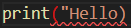
Not everything is as simple as missing a quote. Here’s an example, can you find the error here?